
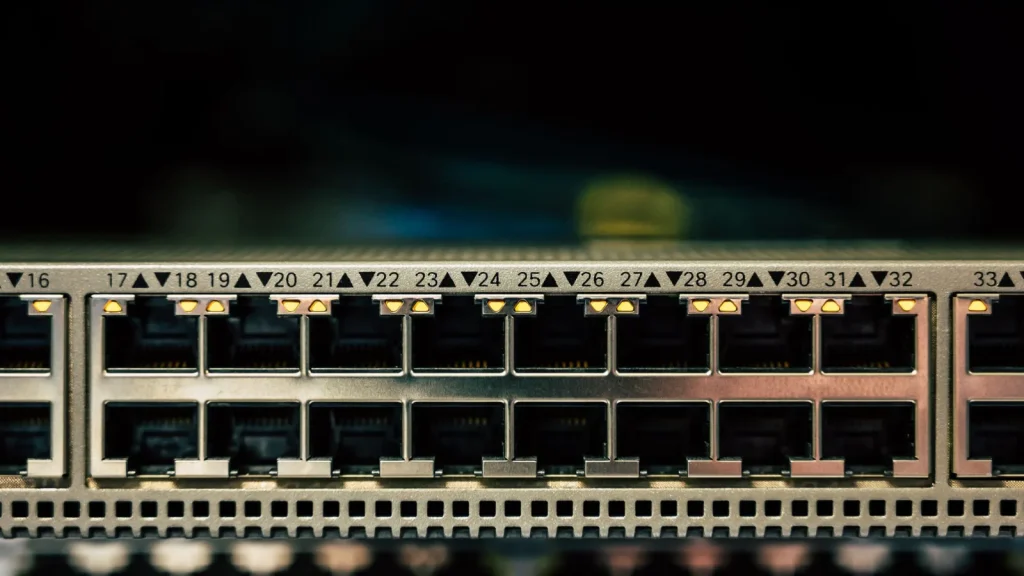
No, you don’t strictly need a PoE switch for IP phones. Almost every business IP phone can run from its own power adapter or a PoE injector. But once you have more than a few phones, a PoE switch is usually the neatest and most reliable option: one cable per phone for both data and power, no power points needed at each desk, and one place to back up with a UPS.
This guide explains how Power over Ethernet works, how much power phones actually draw, how to size a switch, and the extra features worth having for voice.
Key takeaways
- PoE sends power and data down the same network cable. Standard PoE only supplies power after detecting a compatible device.
- Most IP phones need only basic 802.3af PoE and draw a few watts. Wi-Fi access points and cameras may need more.
- Size a PoE switch by total power budget, not just port count, and check whether it budgets by device class or actual draw.
- A managed switch adds voice VLANs, QoS and LLDP-MED, which make phones easier to run and secure.
- Put the PoE switch, router and nbn equipment on a UPS and your phones stay up through short power cuts.
What is Power over Ethernet?
Power over Ethernet (PoE) carries electrical power along a standard network cable alongside the data. The device supplying power, usually a switch or an injector, is called the PSE (power sourcing equipment). The device receiving it, such as a phone, is the PD (powered device).
Standards-based PoE is designed to be safe to plug into anything. The switch checks for a compatible PoE device before sending power, so a laptop or printer plugged into a PoE port just gets data. Be wary of “passive PoE” gear, which skips this check and sends power regardless. It’s common with some wireless equipment and isn’t suitable for mixing with phones.
PoE standards and power levels
There are three IEEE PoE standards in common use. Each is backwards compatible, so a PoE+ switch will happily power an 802.3af phone. According to the Ethernet Alliance overview of 802.3bt, the power available at the device is:
| Standard | Common name | Power at the switch port | Power available to the device | Typical uses |
|---|---|---|---|---|
| IEEE 802.3af (Type 1) | PoE | Up to 15.4 W | 13 W | IP phones, DECT bases, basic cameras |
| IEEE 802.3at (Type 2) | PoE+ | Up to 30 W | 25.5 W | Wi-Fi access points, pan-tilt cameras |
| IEEE 802.3bt (Type 3) | PoE++ | Up to 60 W | 51 W | High-end access points, video devices |
| IEEE 802.3bt (Type 4) | PoE++ | Up to 90 W | 71.3 W | Displays, heavier equipment |
The difference between the two power columns allows for losses in the cable. Within each standard, devices also declare a class that tells the switch roughly how much power they may need.
How much power do IP phones draw?
Less than you might think. Desk phones are among the lightest PoE devices on a network. Yealink’s T54W datasheet, for a colour-screen model with Wi-Fi and Bluetooth, lists PoE power consumption of 2.2 W to 5.5 W, using 802.3af class 3. Yealink’s W73P DECT base is an 802.3af class 1 device.
Two things push consumption up: larger colour screens and expansion modules. Always check the datasheet for the exact models you’re using, and use the maximum figure when planning.
Also check how your switch budgets power. Some switches reserve power based on each device’s class, so a class 3 phone may have up to 15.4 W set aside even though it draws far less. Others allocate based on actual draw, or negotiate the figure with the phone. The approach can make a big difference to how many phones one switch can power.
How to work out a PoE budget
A switch’s PoE budget is the total power it can deliver across all ports at once. It’s often lower than the number of PoE ports multiplied by the maximum per port, so check it on the switch’s datasheet.
- List every device that will be powered by the switch: phones, DECT bases, Wi-Fi access points, cameras.
- Find each device’s maximum PoE draw on its datasheet.
- Add them up.
- Add headroom, say 20 to 30%, for growth, expansion modules and new devices.
- If the switch budgets by class, repeat the sum using the class figures and make sure the budget still covers it.
Worked example
Take an imaginary office with 20 staff. It has 18 desk phones drawing up to 5.5 W each, one DECT base (class 1, up to 4 W at the switch) and three Wi-Fi access points that, for this example, draw up to 13 W each.
- Phones: 18 × 5.5 W = 99 W
- DECT base: 4 W
- Access points: 3 × 13 W = 39 W
- Total: 142 W, or about 180 W with 25% headroom
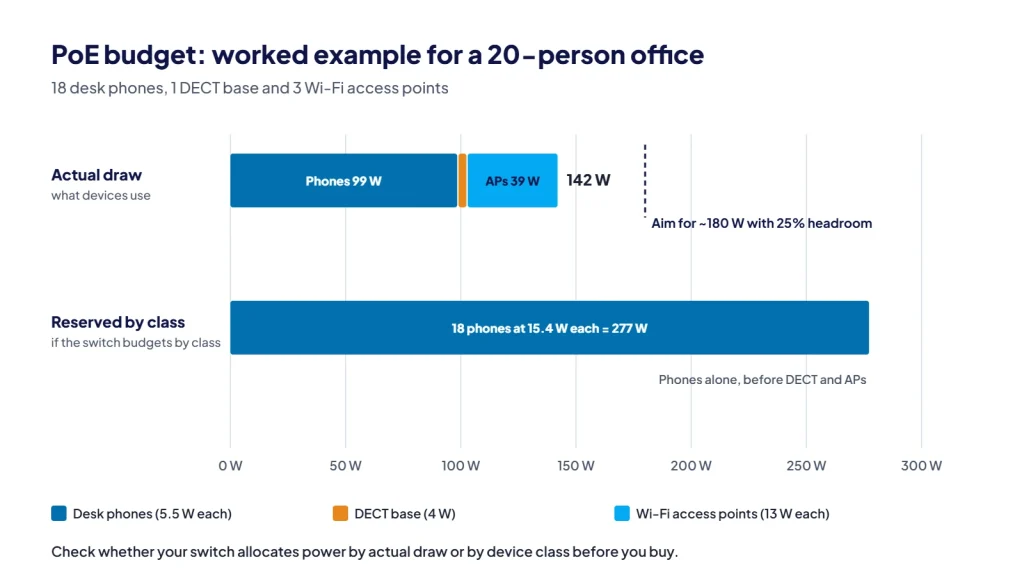
So you’d look for a switch with at least 22 PoE ports and a budget of about 180 W or more, if it allocates by actual draw. If it reserves by class, the 18 class 3 phones alone could claim up to 18 × 15.4 W = 277.2 W, and you’d need a much larger budget or a switch that can allocate by actual usage.
A small office with five phones is far simpler. Five phones at 5.5 W is under 30 W, which any small PoE switch or a few injectors can handle.
PoE switch, injectors or power adapters?
| PoE switch | PoE injector | Phone power adapter | |
|---|---|---|---|
| How it works | Switch powers each phone over its network cable | Small box adds power to one cable between switch and phone | Plug pack into a power point at each desk |
| Best for | Offices with several phones or other PoE devices | One or two phones on an existing non-PoE switch | Single phones, home offices, spare desks |
| Cabling and tidiness | One cable per desk | Extra box and power point near the switch | Extra plug pack and power point at the desk |
| Power cut backup | One UPS covers every phone | Injectors must be on the UPS | Each desk needs its own backup, so usually none |
| Management | Managed models can monitor and restart phones remotely | None | None |
Injectors and adapters are perfectly good for a handful of phones. The switch becomes worthwhile as numbers grow, or when you want phones to keep working through a power cut.
Managed or unmanaged switch?
An unmanaged PoE switch just provides power and connectivity. It’s fine for a very small office on a simple network.
A managed switch adds features that matter for voice:
- Voice VLAN. Phones sit on their own virtual network, separate from computers, which simplifies QoS and security.
- QoS. The switch can prioritise voice traffic marked EF (DSCP 46), the marking the IETF’s RFC 4594 recommends for VoIP.
- LLDP-MED. Lets the switch tell each phone which voice VLAN to use and exchange power information, so phones configure themselves when plugged in. Cisco’s LLDP-MED guide shows how this works on a small business switch.
- Per-port power control and monitoring. You can see what each device draws and restart a frozen phone remotely by cycling its port.
For most businesses with ten or more phones, managed is worth it. Our guide on whether your network is ready for VoIP covers QoS and VLANs alongside internet and firewall settings.
Keeping phones up in a power cut
nbn notes that equipment connected via the nbn won’t work during a power outage. A PoE switch makes backup simpler, because one UPS can keep every phone running. To stay on calls, the UPS needs to cover the PoE switch, your router or firewall, and the nbn connection box. Size it for the combined load and the runtime you want.
Longer outages usually take out the internet as well, so combine the UPS with a mobile backup plan, such as a 4G or 5G failover router or diverting calls to mobiles.
Pass-through PC ports: gigabit or 10/100?
Most desk phones have two network ports, one to the wall and one for a computer, so a desk only needs one cable. Traffic from the computer passes through the phone.
Check the port speed. On a 10/100 phone, the computer is limited to 100 Mbps, which slows large file transfers and backups. Gigabit phones such as the Yealink T54W avoid that. If your desks have computers connected through the phone, choose gigabit models, and make sure the switch ports are gigabit too.
How CloudLine handles PoE
CloudLine doesn’t stock PoE switches in our shop at the moment. When we install a phone system, we can recommend a switch that fits your phones, DECT bases and other devices, and set it up with a voice VLAN, QoS and the right power settings. Because CloudLine is part of an ISO 27001 certified IT company, we can look at the rest of the network at the same time.
For phones and add-ons, browse our desk phones and accessories. If you’re weighing cordless options, see DECT or desk phones.
Frequently asked questions
Can a PoE switch damage a computer or printer?
Not with standards-based PoE. The switch only supplies power after detecting a compatible PoE device, so other devices just get a normal network connection. Non-standard passive PoE equipment doesn’t do this check.
Do IP phones need PoE+?
Usually not. Most desk phones and DECT bases use standard 802.3af PoE. PoE+ is mainly needed for devices such as Wi-Fi access points and some cameras, but a PoE+ switch works fine with 802.3af phones.
Can I mix PoE and non-PoE devices on the same switch?
Yes. Computers, printers and other non-PoE devices work normally on PoE ports.
What if I only have one or two phones?
Use the phones’ power adapters or a PoE injector. A PoE switch is only worthwhile once you have several PoE devices or want UPS backup for all phones.
Planning a new phone system and not sure what your network needs? Request a quote or call 1800 256 830 and we’ll include switch and network advice in the plan.