

VoIP (Voice over Internet Protocol) is a way of making phone calls over an internet or data connection instead of the old copper phone network. Your voice is turned into small packets of data, sent across the network and turned back into sound at the other end. You can still call and receive calls from any landline or mobile number.
If your business has a phone service on the NBN, you are very likely using VoIP already. The federal government’s own guide says telephone services over the NBN are delivered using VoIP. What business VoIP adds is the phone system on top: extensions, call queues, menus, voicemail to email and apps that let your team take calls anywhere.
Key takeaways
- VoIP means making and receiving calls over an internet connection rather than a copper phone line.
- In NBN fixed-line areas the old copper phone lines have been switched off, so business phone services now run over the NBN using VoIP.
- Business VoIP usually comes as a hosted PBX (a complete cloud phone system) or SIP trunks (lines for a phone system you already own).
- You can use VoIP on IP desk phones, cordless DECT phones, or apps on a computer or mobile.
- VoIP depends on your internet and power, so plan for outages and keep a charged mobile for 000 calls.
What does VoIP mean?
Voice over Internet Protocol describes the method, not a particular product. Internet Protocol (IP) is the set of rules computers use to send data to each other. VoIP uses the same rules to send voice, which is why a VoIP phone plugs into a computer network rather than a phone socket.
You will also see VoIP called internet calling, IP telephony, a cloud phone system or a hosted phone system. In a business setting they all describe much the same thing: your calls travel as data, and the features that used to live in a box on the wall are handled by software.
How does VoIP work?
Here is what happens when someone in your office rings a customer’s mobile:
- The phone connects to your phone system. Your VoIP phone or app is registered to a phone system, either hosted by a provider in the cloud or running on equipment you own. Most business systems use a standard signalling protocol called SIP to set up and end calls.
- Your voice is digitised. The phone samples your voice and compresses it using a codec (a coding method), then splits it into small packets.
- The packets cross the network. They travel from your phone, through your office network and router, over your internet connection to the provider.
- The call is handed to the phone networks. The provider connects the call to the Australian phone networks, so it can reach any landline or mobile number, not only other VoIP users.
- The same happens in reverse. The other person’s voice comes back to you as packets and is turned back into sound, many times a second, for as long as the call lasts.
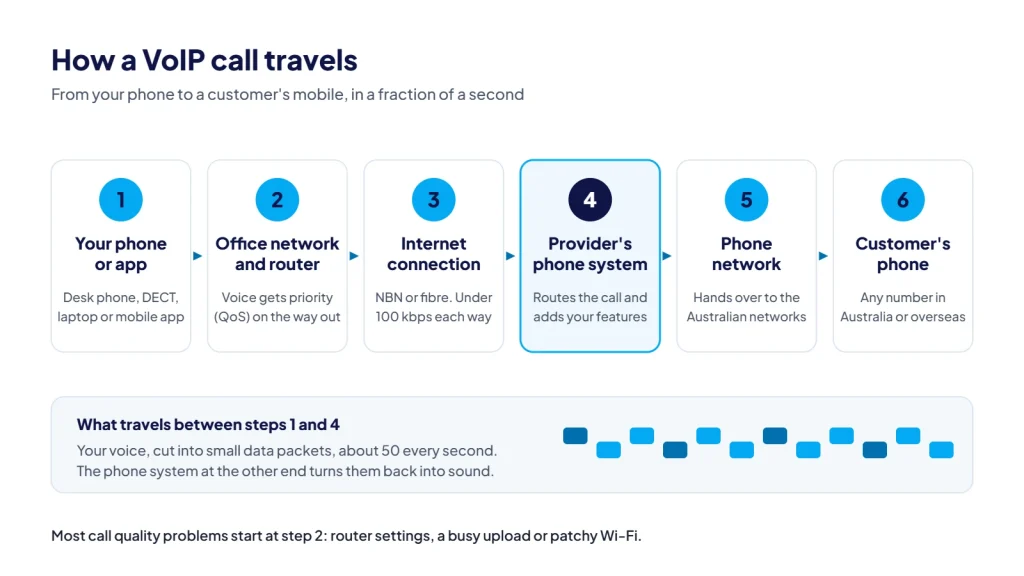
A well set-up VoIP call sounds like any other phone call. When calls sound choppy, the cause is usually in step 3: a busy connection, a misconfigured router or patchy Wi-Fi.
VoIP vs landline: what changed in Australia?
For most of the last century, business phones ran on the public switched telephone network (PSTN): copper wires from each premises to a telephone exchange. Larger businesses often added ISDN, a digital service over the same copper that carried several calls at once.
The NBN changed that. According to nbn co, once an area is declared ready for service, affected phone and internet services are permanently switched off around 18 months later. That includes landline phone services over Telstra’s copper lines. Some fixed wireless and satellite customers can keep a copper landline, but in NBN fixed-line areas the old copper phone service is gone, and phone services now run over the NBN as VoIP.
So the real choice for most businesses today is not VoIP or landline. It is a basic phone service from an internet provider, or a proper business phone system built for how your team works.
| Traditional copper landline (PSTN) | Business VoIP | |
|---|---|---|
| How calls travel | Dedicated copper line to the exchange | Data over your internet connection |
| Where you can answer | Only the phone plugged into that line | Desk phones, cordless phones, computers and mobiles, in the office or anywhere with internet |
| Adding a line | A new physical line and a technician | Usually a settings change |
| Features | Basic, often extra-cost add-ons | Extensions, queues, menus, voicemail to email and recording are typical |
| Availability today | Switched off in NBN fixed-line areas | Works over the NBN and other business internet services |
| Power cut | Old corded phones often kept working | Stops unless your equipment has backup power, or calls divert to mobiles |
What types of business VoIP are there?
Business VoIP comes in three main forms, and many businesses use more than one.
Hosted PBX (cloud phone system)
A PBX is the phone system that gives everyone an extension and routes calls around the business. With a hosted PBX, the provider runs that system in the cloud and looks after it. You get the features without buying or maintaining a phone system box, and you add or remove users as your team changes. Our guide to what a hosted PBX is and who it suits covers this in more detail.
SIP trunking
If you already own a phone system that can talk SIP, you may only need the lines. SIP trunks connect your existing system to the phone network over the internet, replacing old ISDN or PSTN lines. You keep your system; the provider supplies the capacity to make and receive calls.
Softphones and apps
A softphone is an app that turns a computer or mobile into a phone on your business system. Staff can make and take calls on your business number from a laptop at home or a mobile on the road. Our guide to softphones explains how they work and where they fit.
What is a VoIP phone?
A VoIP phone is any device that can make calls over a data network. The common options for a business are:
- IP desk phones. They look like a normal office phone but plug into your network with an ethernet cable. Many can be powered over the same cable if your network switch supplies Power over Ethernet (PoE).
- Cordless DECT phones. A base station connects to the network and handsets roam around the site. They suit warehouses, workshops, clinics and anyone who walks while they talk.
- Apps and headsets. A desktop or mobile app with a good headset can replace a desk phone entirely for people who work mostly at a computer or on the move.
An old analogue phone generally cannot be plugged straight into a VoIP service without an adapter, and not every analogue phone works well with one. You can see the desk phones, cordless DECT phones and headsets we supply in the CloudLine shop.
What do you need to use VoIP?
You need a reliable internet connection, a network that treats voice properly, and a phone system or provider.
A connection with enough headroom. Voice does not need much bandwidth. On our hosted PBX, each call uses less than 100 kbps in each direction. What matters more is that the connection is stable and is not saturated by uploads, backups or video meetings when calls are happening.
A network set up for voice. Most call quality problems come from inside the building, not from the internet. The common culprits are:
- Router features such as SIP ALG that interfere with VoIP traffic
- No priority for voice when the connection is busy (quality of service, or QoS)
- Patchy Wi-Fi for staff on laptops and mobiles
- Firewalls that block or time out calls
Our checklist on whether your network is ready for VoIP walks through each of these.
What affects call quality. Three measures matter most. Latency is the delay before your voice arrives. Jitter is how unevenly the packets arrive. Packet loss is how many never arrive at all. Keep all three low and a VoIP call sounds as clear as, or clearer than, an old landline call.
What are the pros and limits of VoIP?
Why businesses use it
- Answer anywhere. The same business number rings on desk phones, laptops and mobiles.
- Features that used to cost extra. Queues, menus, business-hours routing, voicemail to email and call recording are standard on most business systems.
- Easy changes. Adding a staff member or changing where calls go is usually a settings change, not a technician visit.
- Keep your numbers. Existing numbers can usually move to a VoIP provider, and a new office does not mean a new number.
The honest limits
- It depends on your internet. If your connection drops, calls to your desk phones stop. A good system lets you divert calls to mobiles or another number, and lets staff keep working on a mobile app over mobile data.
- It depends on power. nbn co says landline phone and internet services won’t work in a power outage within the network or your premises. Your router, switch and phones need power too.
- Quality depends on your network. A busy or poorly configured network is the most common cause of poor calls, which is why a network check before you switch is worth doing.
000 calls and power outages. ACMA advises that most services connected to the NBN won’t work during a power outage, which means you won’t be able to call 000 from them. It also notes 000 can be called from certain VoIP services, not all, and that when you call from VoIP the operator will ask for your town and state because you may not be at your billing address. Check with your provider how 000 calls work on your service, keep your service address up to date, and keep a charged mobile phone handy.
How CloudLine does VoIP
CloudLine is an Australian business phone provider based in Brendale, north of Brisbane, and part of an ISO 27001 certified IT company. That matters with VoIP, because call quality depends on the network your phones run on. Before you switch, we can check your network and firewall, so the usual problems are fixed before your first call rather than after a week of complaints.
Most businesses start with our business phone systems: a hosted PBX with apps, desk phones and features like queues, IVR menus and an AI receptionist, or SIP trunks if you already own a phone system you want to keep.
Frequently asked questions
Is VoIP the same as a landline?
Not quite. A traditional landline ran over copper to a telephone exchange. VoIP runs over an internet connection. In NBN fixed-line areas the copper phone service has been switched off, so what people now call a landline is usually a VoIP service delivered over the NBN.
Can I keep my existing phone number if I move to VoIP?
Usually, yes. Local numbers, 1300 and 1800 numbers can generally be moved (ported) between providers. Keep your current service active until the port is complete so the number is not lost.
How much internet speed do I need for VoIP?
Less than most people expect. Each call on our hosted PBX uses less than 100 kbps each way. The bigger question is whether your connection has spare capacity when everyone is busy, and whether your router gives voice priority.
Does VoIP work if the power goes out?
Not on its own. Your internet equipment and phones need power, and NBN services generally stop during a power outage. Battery backup for your network equipment helps for short outages, and staff can keep taking calls on a mobile app over mobile data. Keep a charged mobile for emergency calls.
Is VoIP secure?
It can be, if it is set up properly. Use strong passwords and PINs, keep phones and routers updated, restrict international calling you do not need, and make sure your firewall is configured for VoIP rather than wide open.
Want to know whether VoIP will work well in your office? Request a quote and we’ll look at your team, your numbers and your network, or call us on 1800 256 830.