SIP ALG is a router and firewall feature that tries to help phone calls get through NAT by rewriting the addresses inside SIP messages. On most modern VoIP setups it does more harm than good. It’s one of the most common causes of one-way audio, calls that drop after about 30 seconds, and desk phones that keep losing registration.
If your phone system is hosted in the cloud, or you use a SIP trunk from a provider that handles NAT itself, the usual fix is to turn SIP ALG off, restart the router and let the phones register again. This guide explains what SIP ALG does, how to tell whether it’s behind your problem, and where to find the setting on routers and firewalls commonly used by Australian businesses.
Key takeaways
- SIP ALG rewrites SIP and SDP messages to “fix” NAT, but modern phones and VoIP providers already handle NAT, so the two often clash.
- Classic symptoms are one-way audio, calls dropping at around 30 seconds or 15 minutes, phones going offline and failed transfers.
- The internet standards for NAT behaviour recommend that ALGs for UDP-based protocols be turned off.
- The setting has different names on different brands (SIP ALG, SIP helper, SIP transformations, SIP module). Restart the router and phones after changing it.
- SIP ALG is only one of several router settings that affect calls. UDP timeouts, port forwarding and double NAT matter too.
What is an ALG, and what does SIP ALG try to do?
Most office networks use NAT (network address translation). Each device has a private address, such as 192.168.1.20, and the router shares one public address between them, tracking which conversation belongs to which device.
SIP, the signalling protocol VoIP phones use to set up calls, is awkward for NAT. SIP messages carry IP addresses and ports inside them, including a section called SDP that tells the other end where to send the audio. Behind NAT, those are private addresses that can’t be reached from the internet.
An ALG (application layer gateway) is router software that inspects traffic for a particular protocol and rewrites it. A SIP ALG looks inside SIP packets, swaps private addresses for the public one and opens ports for the audio stream (RTP). In theory that makes VoIP “just work” behind NAT. In practice, the IETF’s NAT behaviour requirements in RFC 4787 state that NAT ALGs for UDP-based protocols should be turned off, and RFC 6314 notes that experience shows ALGs can have an adverse impact on how SIP works.
Why does SIP ALG break VoIP calls?
Modern IP phones and VoIP platforms already deal with NAT. Phones send regular keep-alives, and providers detect the real public address and port a phone is using and reply to that. When a router’s ALG rewrites the same messages as well, the two fixes conflict. The ALG may rewrite an address that was already correct, change one header but not another, or open the wrong port for the audio.
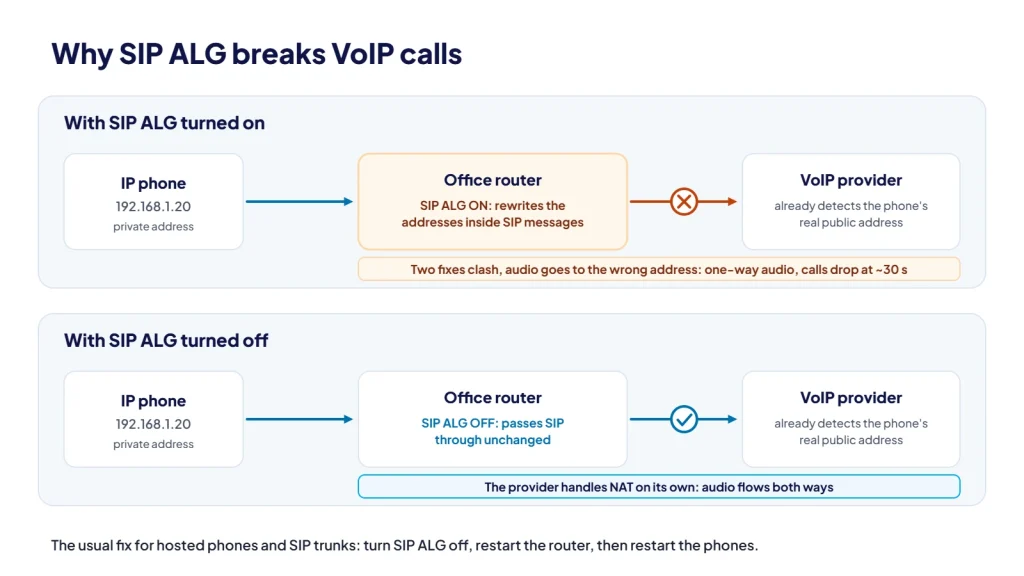
The result is a set of faults that look random but usually follow a pattern:
- One-way or no audio. The call connects, but one side can’t hear the other because the audio was sent to the wrong address or port.
- Calls dropping after about 30 seconds. When a call is answered, the caller’s side must acknowledge it. If that acknowledgement is lost or mangled, the SIP standard (RFC 3261) has the answering side keep retrying for 32 seconds and then end the call.
- Calls dropping at around 15 minutes. Many systems use SIP session timers, which RFC 4028 recommends setting to 30 minutes with a refresh at the halfway point. If the ALG breaks the refresh, the call ends when the timer runs out.
- Phones unregistering or showing offline. Outbound calls may still work while inbound calls fail or go straight to voicemail.
- Hold, transfer or park failing. These features send new messages that change where the audio goes, which gives a faulty ALG another chance to get it wrong.
None of these symptoms prove SIP ALG is the cause. Short UDP timeouts, strict firewall rules and double NAT can produce the same faults, which is why it’s worth checking properly rather than guessing.
How can you tell if SIP ALG is the problem?
- Look at the timing. Drops at a consistent point (around 30 seconds or 15 minutes) point strongly to NAT or ALG interference rather than a poor internet connection, which tends to cause choppy audio instead.
- Check the router or firewall for anything named SIP ALG, SIP helper, SIP transformations, SIP module or VoIP passthrough. If it’s on, it’s a prime suspect.
- Test on a different connection, such as a softphone app on a mobile hotspot. If the fault disappears, the office network is the likely cause.
- Ask your provider to look at the SIP traffic. Your provider can see whether addresses in the messages have been rewritten unexpectedly. Sophos lists a phone registering with the firewall’s address instead of its own as a sign the SIP module is interfering.
- Turn it off in a quiet period and test. The change is easy to reverse if it doesn’t help.
How to turn off SIP ALG on common routers and firewalls
The general steps are the same everywhere: log in to the router’s admin page, find the SIP ALG setting, disable it and save. Then restart the router (or clear its existing sessions) and restart the phones so they register afresh. Without the restart, old connections can stay in the router’s table and the fault appears to persist.
Menus change between firmware versions, so treat the table below as a guide and follow the linked vendor documentation for your model.
| Router or firewall | Where to find it | Vendor documentation |
|---|---|---|
| NETGEAR routers | ADVANCED > Setup > WAN Setup, tick Disable SIP ALG, then Apply. | NETGEAR support |
| TP-Link modem routers | Advanced > NAT Forwarding > ALG, turn off SIP ALG. On Deco mesh systems: Deco app > More > Advanced > NAT Forwarding > SIP ALG. | TP-Link modem routers, TP-Link Deco |
| DrayTek Vigor | Newer firmware has SIP ALG off by default, with the setting under NAT >> ALG. On older models, telnet to the router and run sys sip_alg 0, then sys commit, then sys reboot. | DrayTek Australia FAQ |
| Fortinet FortiGate | The default VoIP ALG mode is proxy-based. In the CLI, delete the SIP entry under config system session-helper, then under config system settings set default-voip-alg-mode kernel-helper-based. Clear SIP sessions or reboot. SIP inspection can also be disabled in the VoIP profile. | Fortinet technical tip |
| Sophos Firewall | From the device console, run system system_modules sip unload. Check the result with system system_modules show. | Sophos VoIP troubleshooting |
| SonicWall | SonicWall’s SIP ALG is the Enable SIP Transformations option in the VoIP settings. The same page has an Enable consistent NAT option, which is off by default. | SonicWall VoIP settings |
| pfSense | Netgate’s VoIP guide doesn’t rely on an ALG. It recommends manual outbound NAT with static port for UDP, and setting Firewall Optimization Options to Conservative (System > Advanced, Firewall & NAT) if phones randomly disconnect. | Netgate docs |
| Ubiquiti UniFi and others | The location of SIP-related settings has changed between software versions. Check your router’s current documentation or ask your IT provider. | Check your router’s documentation |
Fortinet points out that disabling SIP ALG isn’t always the first step, particularly where an on-premises phone system relies on the firewall for NAT. If you run your own PBX in the office, check with whoever set it up before changing firewall behaviour.
What if you can’t turn SIP ALG off?
Some ISP-supplied modems hide the setting, lock it, or turn it back on after a firmware update or factory reset. If that happens, you have a few options:
- Put the ISP modem into bridge mode and use your own router or firewall, where you control the settings. This also removes double NAT.
- Ask your provider about encrypted signalling (SIP over TLS). An ALG can’t read encrypted messages, so it can’t rewrite them. Your phones and provider both need to support it.
- Ask about an alternative SIP port. Some ALGs only inspect the standard SIP port, 5060, so another port can sidestep them if your provider supports it.
- Replace the router with one you can properly configure and keep updated.
Other firewall and NAT settings that matter for VoIP
SIP ALG isn’t the only router setting that affects calls. When we check a network for VoIP, we also look at:
- UDP timeouts. The router forgets idle UDP connections after a set time. RFC 4787 says this timer must not be less than two minutes and recommends five minutes or more. Netgate notes that pfSense’s default UDP timeouts are too low for some VoIP services. If the router forgets a phone before it re-registers, inbound calls fail.
- Audio (RTP) port ranges. Call audio uses a range of UDP ports, separate from signalling. If your firewall restricts outbound traffic, allow your provider’s signalling and media addresses and ports, rather than opening wide ranges to the whole internet.
- Port forwarding. Hosted phones and SIP trunks registering outbound generally don’t need inbound port forwards. Forwarding SIP ports to the internet invites scanning and fraud attempts. If an on-premises system needs them, restrict them to your provider’s addresses.
- Upload bandwidth and QoS. Prioritising voice on the upload side of your connection prevents backups or video calls from causing choppy audio.
For the wider picture, including jitter, bandwidth and QoS, see our guide: is your network ready for VoIP?
Can CloudLine check this for you?
Yes. CloudLine is part of an ISO 27001 certified IT company, not just another phone vendor. Before you switch, our team can review your router and firewall, turn off SIP ALG where it’s needed, check UDP timeouts and make sure the rules your phones depend on don’t leave unnecessary holes in your security.
That applies whether you’re moving to our hosted PBX or connecting your own phone system with SIP trunking. If you’re already a customer and seeing any of the symptoms above, our Help Centre and support team can help you work through it.
Frequently asked questions
Should SIP ALG be on or off?
For hosted phone systems and SIP trunks that register over the internet, off is almost always the right answer. The exception is an on-premises setup that has been deliberately configured to rely on the firewall’s SIP handling. Follow your provider’s advice for your setup.
Is turning off SIP ALG a security risk?
No. SIP ALG isn’t a security feature. Turning it off stops the router rewriting SIP messages and opening ports automatically for calls. Your firewall still blocks unsolicited inbound traffic as before.
Why did SIP ALG turn itself back on?
Firmware updates and factory resets can restore default settings, and some ISPs manage their routers remotely. If call problems return after a router update or outage, check the setting again.
Does SIP ALG affect the mobile app?
It can when the app is on your office Wi-Fi, because the app’s traffic then passes through the same router. On mobile data it bypasses your office router altogether.
If your calls are dropping or you’re planning a move to VoIP, we can check your network and firewall first. Request a quote or call us on 1800 256 830.