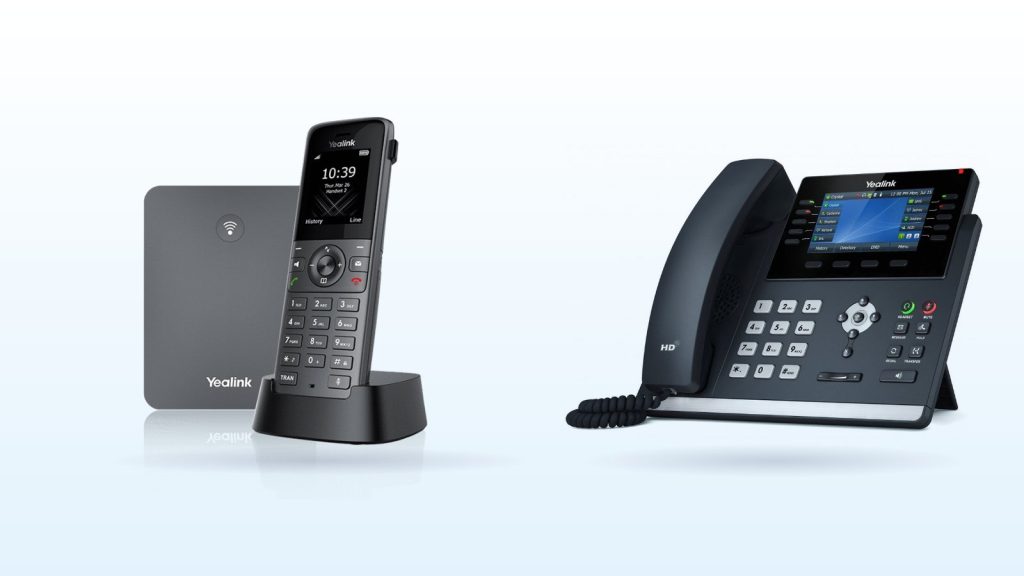
If your people work mostly at a desk and handle a lot of calls, a desk phone is usually the better choice. If they move around, on a warehouse floor, a shop floor, between consulting rooms or away from reception, a cordless DECT phone keeps them reachable without being tied to one spot.
Most businesses end up with a mix. Both types connect to the same phone system, share the same extensions, ring groups and queues, and can transfer calls to each other. Headsets and phone apps add two more options. This guide explains how each works and which suits different workplaces.
Key takeaways
- DECT is a cordless standard with its own radio band (1880 to 1900 MHz in Australia), separate from Wi-Fi.
- An IP DECT system is a base station on your network plus cordless handsets. Larger sites use multiple bases so calls hand over as people walk.
- Desk phones offer bigger screens, more programmable keys (BLF), expansion modules and wired reliability.
- Choose by how people work: stationary and call-heavy suits a desk phone, mobile suits DECT, laptop-based suits a headset or app.
What is a DECT phone?
DECT stands for Digital Enhanced Cordless Telecommunications. It’s the standard behind most modern cordless phones, at home and in business. In Australia, DECT operates between 1880 MHz and 1900 MHz under the ACMA cordless communications devices class licence.
Because DECT has its own band, it doesn’t compete with your Wi-Fi, which uses 2.4 GHz, 5 GHz and higher bands. That’s a practical advantage in a busy office where the Wi-Fi is already crowded.
One thing to watch: DECT equipment is made in regional versions. Yealink’s W73P datasheet, for example, lists 1880 to 1900 MHz for Europe and 1920 to 1930 MHz for the US. Buy handsets and bases supplied for the Australian market rather than importing US models.
How does an IP DECT system work?
A business DECT system has two parts. The base station plugs into your network, usually powered over the network cable (PoE), and registers each handset with your phone system as its own extension. The handsets talk to the base by radio and charge in a small cradle.
A single-cell system suits a small office or shop. Yealink’s W73P, for example, supports up to 10 handsets and 20 simultaneous calls on one base, with up to six optional repeaters to extend coverage. Yealink quotes range as up to 50 m indoors and 300 m outdoors in ideal conditions. Walls, metal shelving, lifts and cool rooms all reduce that in practice.
Larger sites use a multi-cell system: several bases working together so a call hands over from one to the next as someone walks. Yealink’s W80 multi-cell system supports up to 30 base stations, up to 100 handsets and other devices, and up to 100 parallel calls. For multi-cell sites, a quick walk-around survey to place the bases is worth doing before installation.
What do desk phones offer?
A desk phone plugs into the network with a cable and is usually powered by it too. That makes it simple and dependable: no batteries to charge, no radio coverage to worry about. Beyond that, desk phones give you:
- Bigger screens for call details, contacts and call history.
- Programmable keys with BLF (busy lamp field), which light up to show whether a colleague is free, on a call or ringing, and transfer with one press.
- Expansion modules for receptionists who need many keys. The Yealink T54W, for example, supports up to three EXP50 modules for up to 180 extra keys.
- A pass-through network port, so a computer can share the phone’s cable. Gigabit models such as the T54W won’t slow the computer down.
- A good speakerphone and a headset port, and on some models Bluetooth and Wi-Fi.
There’s also a middle ground. Some desk phones accept a DECT dongle so cordless handsets can pair with the desk phone. Yealink lists this corded-cordless option for the T54W, with up to four handsets.
DECT vs desk phones compared
| Cordless DECT phone | IP desk phone | |
|---|---|---|
| Mobility | Move freely within range of a base; multi-cell systems hand calls over between bases | Fixed to one spot |
| Audio | HD (wideband) audio on current business models | HD audio, with a larger speaker and better speakerphone |
| Power | Rechargeable battery; the base needs PoE or a power adapter | PoE or a power adapter; no battery |
| Battery life | Yealink quotes up to 35 hours talk time for the W73H handset in ideal conditions; batteries wear over the years | Not applicable |
| Keys and screen | Small screen, limited programmable keys | Larger screen, BLF keys, optional expansion modules |
| Setup | Base on the network, handsets paired; larger sites need planning for base placement | Plug in a network cable |
| Cost of ownership | Base station plus handsets, chargers, and replacement batteries over time | One device per desk, usually a long service life |
| Best for | Staff on the move: warehouses, retail, clinics, sites across several rooms | Staff at desks who make or answer many calls |
Which suits your workplace?
Reception
A desk phone with BLF keys, and often an expansion module, is usually best. The receptionist can see who is free and transfer in one press. If they also walk to the door or waiting room, add a DECT handset on the same extension or use a desk phone with a DECT dongle.
Warehouses, workshops and yards
DECT is the natural fit. Staff answer calls wherever they are, and multi-cell systems cover large or awkward buildings. Choose rugged handsets where there’s dust or drops, and plan base placement around racking and cool rooms.
Retail floors
A desk phone at the counter plus a few DECT handsets for staff on the floor works well. A ring group can ring all of them at once so calls don’t ring out.
Clinics and allied health
Front desk staff tend to suit desk phones. Practitioners who move between rooms, or practice managers who are rarely at their desk, often do better with DECT handsets.
Home offices and hybrid staff
A desk phone suits someone who works from the same home desk every day. Many hybrid staff find a headset and a softphone app on their laptop simpler, since it travels with them.
What about headsets and phone apps?
Headsets are a third option, not just an accessory. For people on the phone most of the day, a good headset reduces neck strain and background noise. Wired USB headsets plug into a laptop, while wireless models use DECT or Bluetooth and let people walk away from the desk. See our range of business headsets.
Apps are the fourth. A softphone puts your business extension on a laptop or mobile, so staff can make and take calls with no extra hardware. Our guide on what a softphone is covers when that’s enough on its own and when it works better alongside a physical phone.
How CloudLine sets it up
CloudLine’s hosted PBX works with Yealink and Fanvil desk phones, supplied ready to plug in, or you can bring your own supported models. Our shop also stocks cordless DECT phones. Every device, whether desk phone, DECT handset or app, is just another way to reach the same extension, so you can mix them freely and change your mind later.
Browse our cordless DECT phones and desk phones, or the full shop. If you’re planning PoE for the phones and DECT bases, our guide to PoE switches for IP phones explains the options.
Frequently asked questions
Can DECT phones and desk phones be on the same phone system?
Yes. Both register as extensions on the same system, so they can be in the same ring groups and queues, and calls transfer between them normally.
Does DECT interfere with Wi-Fi?
No. In Australia DECT uses 1880 to 1900 MHz, which is separate from the bands Wi-Fi uses.
Can I use a home cordless phone with a business phone system?
Usually not directly. A home cordless phone is designed to plug into a phone line, not a VoIP system. A business IP DECT system connects to your network and registers each handset as its own extension.
How many handsets can one DECT base support?
It depends on the model. A single-cell base such as the Yealink W73P supports up to 10 handsets. Multi-cell systems such as the Yealink W80 scale to up to 100 devices across as many as 30 bases.
Do DECT bases need PoE?
Not necessarily. Business DECT bases generally accept PoE or a power adapter. The W73P base, for example, supports standard 802.3af PoE.
Not sure which mix suits your team? Call us on 1800 256 830 or request a quote and we’ll recommend phones that fit how your people work.