

A 3CX alternative is any business phone system that does the same core job (extensions, queues, menus, apps and desk phones) without you licensing, hosting and maintaining 3CX software yourself or through a partner. For most small and mid-sized Australian businesses, the realistic alternative is a fully managed hosted PBX, where one provider runs the system, the phone lines and the numbers, and supports all of it.
3CX is a capable product and suits plenty of businesses. People usually start looking elsewhere when the licensing changes, when the server needs another upgrade, or when they realise they are paying one company for software, another for hosting and a third for lines. This guide covers what to compare and how a move works in practice.
Key takeaways
- 3CX is licensed per system, per year, by the number of simultaneous calls, and you (or a partner) look after hosting and updates.
- Since late 2025, 3CX has tied a maximum number of extensions to each licence size, which has pushed some businesses to review their options.
- A fully managed hosted PBX bundles the system, lines, numbers, updates and support with one provider, usually priced per user.
- Compare who hosts it, who patches it, how it is licensed, who supports it and how your numbers move, not just the feature list.
- Your numbers can come with you. Plan the move around porting, phone compatibility and rebuilding your call flows.
Why businesses look for a 3CX alternative
The reasons tend to be practical rather than about features. Common ones we hear:
- Licensing changes. 3CX licenses each system annually by simultaneous calls (SC), not per user. In December 2025 it announced a new Basic Edition with a maximum-extension fair usage policy, pairing each licence size with a cap on extensions (for example, 8 simultaneous calls with up to 40 extensions). Businesses with many extensions on a small licence may need a bigger licence at renewal.
- Someone has to run the server. Unless you use 3CX’s own hosting, the system runs on a server or cloud instance that you or your IT partner must keep updated, backed up and secured. Major version upgrades have also involved operating system upgrades.
- Several suppliers. A typical 3CX setup has a licence from 3CX or a reseller, hosting from a cloud provider, SIP trunks and numbers from a telco, and support from whoever installed it. When calls fail, it is not always clear who owns the problem.
- Security confidence. In March 2023 the 3CX desktop app was compromised in a supply chain attack investigated by Mandiant. 3CX responded and moved customers to fixed versions, and any software vendor can be targeted. For many businesses, the lasting lesson was to ask who is responsible for patching and monitoring their phone system.
None of this makes 3CX a bad choice. It does mean the right comparison is about how the whole service is run, not just what the software can do.
What your options actually are
There are three broad ways to run a business phone system today. The table compares them in general terms.
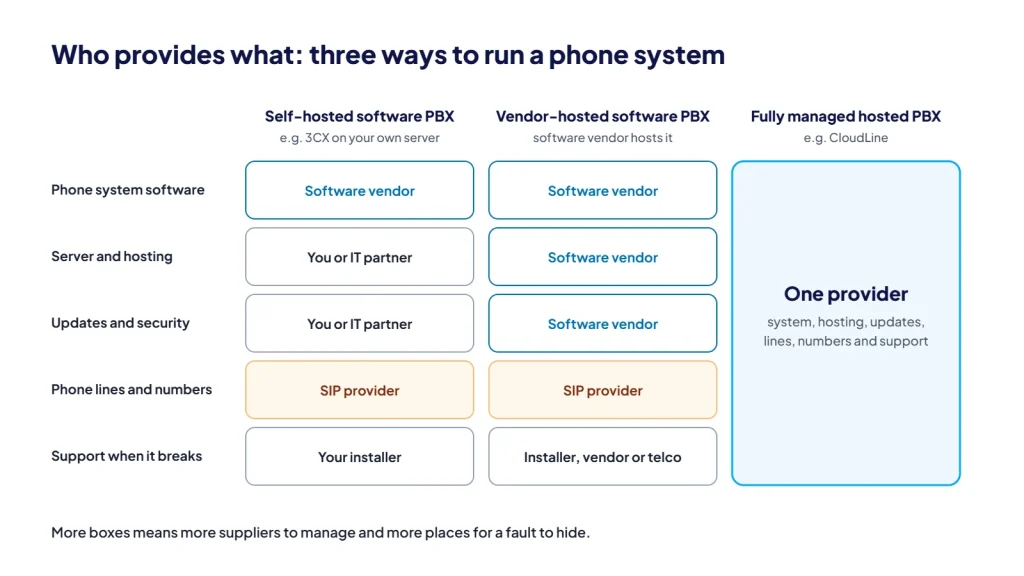
| Self-hosted software PBX (such as 3CX) | Software PBX hosted by the vendor | Fully managed hosted PBX | |
|---|---|---|---|
| Who hosts the system | You or your IT partner, on-site or in the cloud | The software vendor | The phone provider |
| Who installs updates | You or your IT partner | Usually the vendor, on its schedule | The provider |
| How it is licensed | Per system, per year, by simultaneous calls | Per system, per year, by simultaneous calls | Usually per user, per month |
| Phone lines and numbers | Bought separately from a SIP provider | Bought separately from a SIP provider | Included from the same provider |
| Who you call when something breaks | Your installer, then the vendor or telco | Your installer, then the vendor or telco | One provider for the system, lines and numbers |
| Control and customisation | Highest | High | Set up for you to match how you work |
If you have in-house IT that enjoys running a PBX, self-hosting gives the most control. If you would rather not think about servers, licences and lines at all, a fully managed hosted PBX is the simpler model. You can read more in what a hosted PBX is and who it suits.
What to compare in any 3CX alternative
Feature lists look similar across providers. These are the questions that separate them.
- How is it priced, and what makes the bill change? Per user, per simultaneous call or per site? Are calls included or charged as you go? What happens when you add staff or a second office?
- Who hosts, patches and monitors it? Ask how updates are tested and rolled out, and who is watching for security issues.
- Are lines and numbers included? One provider for the system, SIP trunks and your 1300, 1800 and local numbers removes a lot of finger-pointing.
- Can you keep your numbers? Numbers can almost always be ported. Ask who handles the paperwork and how cut-over is timed.
- Will your desk phones work? Many Yealink and Fanvil phones used with 3CX can be re-provisioned for another platform. Check your models before you buy anything new.
- What apps are included? Look for desktop, mobile and web apps that show your business number, not your personal mobile.
- Does it cover the features you rely on? Queues, IVR menus, business hours, call recording, reporting, reception console, Microsoft 365 or CRM integration, website live chat and AI features.
- Who supports you, and when? Local support that understands your network and firewall is worth more than a longer feature list.
- What is the contract? Month to month or fixed term, and what happens to your numbers if you leave.
How CloudLine compares
CloudLine is a fully managed hosted PBX. It is not built on 3CX. We host and update the system, supply the SIP connectivity and your numbers, and support all of it from Brendale, QLD, with 18+ years in telco behind us.
- Priced per user. You add or remove users as your team changes, rather than sizing a simultaneous-call licence. See current Hosted PBX pricing.
- One provider. The phone system, lines, 1300, 1800 and local numbers, porting and desk phones all come from us.
- Apps for every device. Desktop apps for Windows and Mac, iPhone and Android apps, and a web app, all showing your business number.
- AI built in. An AI receptionist and call transcription with summaries are available on Hosted PBX.
- Backed by an IT company. We are part of an ISO 27001 certified IT company, so we can check and secure the network and firewall your phones run through, not just the phones.
If your 3CX system works well and you mainly want better lines, you do not have to replace it. Our SIP trunks connect to most SIP-compatible phone systems. Tell us your system and version and we will confirm.
How moving off 3CX works
A well-planned move is mostly preparation. The switch itself is usually quick.
- Audit what you have. Export your extension list, ring groups, queues, IVR menus, business hours and holiday settings, and list your numbers and desk phone models.
- Check the network. Confirm your internet connection, firewall rules and settings such as SIP ALG are right for the new system.
- Rebuild the call flows. Your new provider sets up extensions, queues, menus and greetings to match, and it is a good chance to tidy up anything that has grown messy.
- Lodge the number port. Keep your old service running until the port completes. Cancelling early can mean losing a number. See how number porting works.
- Re-provision phones and install apps. Supported desk phones are pointed at the new system, and staff install the desktop and mobile apps.
- Cut over and test. Numbers move across, test calls confirm routing, and your team gets a short walkthrough.
Export anything you need to keep, such as call recordings, voicemail and call history, before your 3CX licence or hosting ends. These usually do not carry across automatically.
Frequently asked questions
Can I keep my phone numbers if I leave 3CX?
Yes. 3CX is software, so your numbers sit with your SIP or number provider. They can be ported to a new provider. Keep the old service active until the port is complete.
Will my Yealink or Fanvil phones work with a new system?
Often, yes. Many models can be re-provisioned for a different platform. Send your provider a list of models and firmware versions before you commit, so you only replace what you have to.
Is a hosted PBX less flexible than 3CX?
You give up direct access to the server, but most businesses never need it. Queues, menus, business hours, recording, reporting and integrations are all configurable. The trade-off is less hands-on control for far less maintenance.
How long does a switch take?
It depends mostly on number porting and how many sites and numbers you have. Simple setups move quickly. Larger ports need a planned cut-over date. We will give you a timeline once we see your numbers.
Is CloudLine affiliated with 3CX?
No. 3CX is a trademark of its owner. CloudLine is an independent Australian provider and our Hosted PBX runs on a different platform.
Weighing up a move? Tell us about your current setup and we will map out what a switch would involve, or call us on 1800 256 830.