
A hosted PBX is a business phone system that runs in a provider’s data centre instead of on a box in your office. Your team gets extensions, call queues, menus, voicemail and apps, and the provider looks after the system, the updates and the connection to the phone network. You connect over the internet using desk phones, cordless phones, computers and mobiles.
It is also called a cloud PBX or cloud phone system. For most small and medium Australian businesses it is now the simplest way to get a proper phone system, but it is not the right fit for everyone. This guide explains what a PBX does, how hosted compares with owning one, and what switching involves.
Key takeaways
- A PBX is the system that gives everyone an extension and routes calls around your business.
- A hosted PBX runs in the cloud, so there is no phone system hardware to buy, house or maintain.
- Cost is usually driven by the number of users, the phones you choose, your numbers and your call plan.
- It suits most businesses with a reliable internet connection, including multi-site and remote teams.
- Switching involves a network check, planning how calls should flow, phones and porting your numbers.
What is a PBX?
PBX stands for private branch exchange. It is a private telephone exchange for one organisation. Instead of every desk having its own separate phone line, the PBX shares a set of outside lines between everyone and handles the calls inside the business.
A PBX phone system does three main jobs:
- Extensions. Everyone gets a short internal number, so colleagues can call and transfer to each other without using an outside line.
- Call routing. Incoming calls go where you want them: reception, a sales queue, a menu (“press 1 for accounts”), voicemail or a mobile after hours.
- Shared outside lines. Outgoing and incoming calls share the lines or channels connected to the PBX, and callers see your business number.
For decades, a PBX was a cabinet on the wall of the comms room, connected to copper phone lines or ISDN. The functions are the same today. What changed is where the PBX lives.
On-premise vs hosted PBX: what’s the difference?
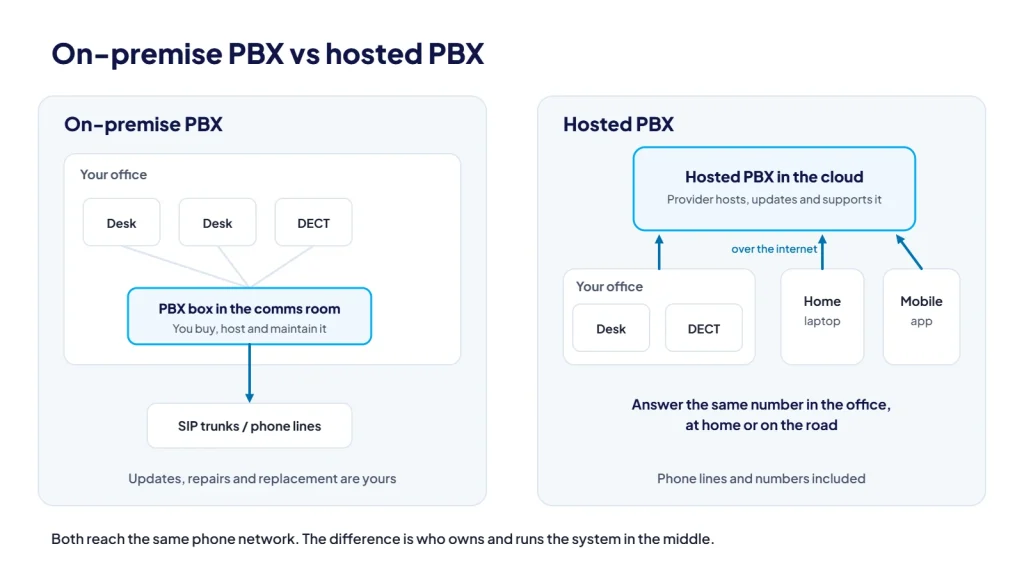
With an on-premise PBX, you own the phone system and it sits in your building. You connect it to the phone network with lines, which today usually means SIP trunks. With a hosted PBX, the provider runs the phone system for you in the cloud and your phones connect to it over the internet.
| On-premise PBX | Hosted (cloud) PBX | |
|---|---|---|
| Where it runs | Hardware or a server in your office | The provider’s data centre |
| Upfront cost | Buy the system, licences and installation | Little or none beyond phones and setup |
| Ongoing cost | Lines, calls, maintenance and eventual replacement | A regular fee, usually per user, plus calls depending on the plan |
| Updates and security patches | Your responsibility or your maintainer’s | Handled by the provider |
| Adding users or sites | May need more licences, cards or hardware | Usually a settings change |
| Remote and mobile staff | Possible, often with extra setup | Built in with desktop and mobile apps |
| If the office loses power or internet | The system and lines go down with the building | The system keeps running; calls can divert to mobiles and staff can use the mobile app |
| Control | Full control of hardware and configuration | Configuration through the provider’s portal or support team |
What features do you get with a hosted PBX?
Features vary between providers, so compare the detail. A well-featured hosted PBX typically includes:
- Extensions and direct numbers. An extension for everyone, with voicemail, and optionally a direct number.
- Call handling. Queues and ring groups, greetings and IVR menus, and routing for business hours and public holidays.
- Voicemail to email. Messages arrive as audio with a text transcript.
- Recording and reporting. Call recording, reports and wallboards to see how calls are being handled.
- Apps. Desktop apps for Windows and Mac, mobile apps for iPhone and Android (callers see your business number), and a web app with nothing to install.
- Team tools. Team chat and presence, audio conferencing and a reception console for drag-and-drop call handling.
- Integrations. Microsoft 365 and CRM or helpdesk integrations, so contacts sync and you can see who is calling.
- AI features. On some systems, an AI receptionist that answers calls and call transcription with summaries after each call.
If you plan to record calls, check what you need to tell callers first. The rules vary between states, and our guide to recording business calls in Australia covers the basics.
What does a hosted PBX cost?
Hosted PBX pricing is usually built from a few parts. Understanding them makes quotes easier to compare, because two plans with the same headline price can include very different things.
- Users. Most hosted PBX plans are priced per user or per extension, often with different tiers depending on the features included.
- Phones and headsets. You can buy desk or cordless phones, bring your own supported models, or run some staff on apps only.
- Numbers. Porting existing numbers, adding local, 1300 or 1800 numbers, and direct numbers for staff can each carry a cost.
- Calls. Plans either include calls or charge as you go. Check which call types are included, and how calls to mobiles, 13/1300 numbers and overseas are charged.
- Setup. Configuration, call flow design, porting and on-site installation may be one-off costs.
- Add-ons and terms. Features such as AI receptionist or extra recording storage may be add-ons, and contract length affects what you are committed to.
We publish current plans and pricing on our Hosted PBX page so you can see what is included before you talk to anyone.
Is a hosted PBX right for your business?
It usually suits
- Small and medium businesses that want a proper phone system without owning hardware
- Teams that work between the office, home and the road
- Multi-site businesses that want one system, with extension-to-extension calls between sites
- Businesses whose old PBX is due for replacement, or whose ISDN or copper lines have already gone
- Anyone who wants features like queues, IVR menus and an AI receptionist without buying extra hardware
It may not suit
- Sites with an unreliable internet connection and no practical way to improve it
- Businesses that recently invested in an on-premise PBX with years of life left. SIP trunks may be the better way to modernise the lines while you keep the system.
- Organisations with specialised requirements, such as complex integrations with on-site equipment, that a hosted platform cannot meet
What does switching to a hosted PBX involve?
A well-run switch is mostly planning. The steps are usually:
- Check your network. Confirm your internet connection, router and firewall are ready for voice. Settings like SIP ALG and missing voice priority are common causes of poor calls.
- Plan your call flow. Decide who answers what, business hours and after-hours routing, menus and queues, and who needs a direct number.
- Choose your devices. Decide who gets a desk phone, who needs a cordless handset, and who will use the apps.
- Port your numbers. ACMA confirms you can usually keep your phone number when you change telcos, including local, 1300 and 1800 numbers. Keep your current service active until the number port is complete, and allow extra time if you are moving a range of numbers.
- Check other services on your old lines. nbn co lists services that need attention when lines change, including back-to-base alarms, lift phones, fax machines and EFTPOS. Talk to those providers before your old lines are cancelled.
- Go live and train. Test calls, voicemail and after-hours routing, and show staff how to transfer and use the apps.
Like any VoIP service, desk phones on a hosted PBX need power and internet at your site. ACMA advises that most NBN services won’t work in a power outage, so you won’t be able to call 000 from them. Keep a charged mobile phone on hand.
How CloudLine does hosted PBX
CloudLine is part of an ISO 27001 certified IT company, so we look at the phone system and the network it depends on together. Before you switch, we can check your network and firewall, set up the phones, port your numbers and build your call flow with you. Support comes from a Brisbane-based team with 18+ years in telco.
Our hosted PBX offers an AI receptionist that answers calls 24/7 in a natural voice, answers common questions such as your hours and location, and puts callers through to the right person, team, queue or voicemail. You choose when it answers: all day, after hours or when everyone is busy. Our guide to AI receptionists and when they make sense explains the trade-offs. You can compare hosted PBX and SIP trunks side by side on our phone systems page.
Frequently asked questions
What is the difference between a hosted PBX and a cloud PBX?
In practice there is none. Both describe a PBX that runs in a provider’s data centre and connects to your phones over the internet. Some providers also call it a hosted or cloud phone system.
What happens to my calls if our internet goes down?
The hosted PBX keeps running in the data centre, so calls can divert to mobiles or another number. Staff can also keep taking calls on the mobile app over mobile data until your connection is back.
Can I keep my existing phones?
Possibly. You can bring your own IP phones if they are supported models, or we can supply Yealink and Fanvil desk phones ready to plug in. Old analogue or proprietary PBX handsets usually cannot be reused directly.
Can I keep my numbers when moving to a hosted PBX?
Usually, yes. Local, 1300 and 1800 numbers can generally be ported from your current provider. We handle the paperwork for simple and complex ports.
Do I need a fast internet connection?
You need a stable one more than a fast one. Each call on our hosted PBX uses less than 100 kbps in each direction, but the connection needs spare capacity at busy times and a router set up to give voice priority.
If you’re weighing up a hosted PBX, see what’s included and current pricing on our Hosted PBX page, request a quote, or call us on 1800 256 830.